Tampilkan postingan dengan label Computer. Tampilkan semua postingan

Senin, 28 Desember 2015

Character Encoding

In the computer world, we use the term "character". A character is an abstract concept, defined by specific parameters, but is the basic unit of meaning. The "A" Latin is not equal to the Greek "alpha" or Arabic "alif" because they have different backgrounds, come from different languages ​​and are pronounced slightly differently, so we can say that they are different characters. The visual representation of a character called "glyph" and different sets of fonts are called glyphs. Groups of characters belonging to a "set" or "repertoire".

When you type something on the keyboard, or upload a file, how does the computer know what to display? That's what the character encoding. The text on the computer really is not composed of letters, is a series of pairs of alphanumeric values. The character encoding acts as a key to interpreting these values ​​correspond to which characters, so much as the spelling indicates which sounds correspond to which letters. The Morse code is a kind of character encoding. It indicates how long and short groups of units (such as beeps or light) should be interpreted to form characters. In Morse code, the characters are only in English letters and numbers. There are many character encodings for computers that translate letters, numbers, accent marks, punctuation marks, international symbols, and so on.

There are many different character encodings, and there are many valid reasons for this. Which character encoding to use depends on what you need us. If you communicate in Russian, it makes sense to use a character encoding that supports well the Cyrillic alphabet. If you communicate in Korean, it will serve well to represent a Hangul and Hanja. If you are a mathematician, I want one that has all the mathematical and scientific symbols, as well as Greek and Latin glyphs. And, if you want all these documents can be viewed by anyone, you'll want an encoding that is fairly common and easily accessible.

  • Unicode - encoding standard that aims to universality. It now comprises 93 different scripts organized into blocks, with many others in the works. The Unicode works differently than the other set of characters in that, instead of hard-coding a glyph, each value is directed to a "code points". These are the hexadecimal values ​​that correspond to the same characters, but the glyphs are provided independently by the programs, such as web browsers. These code points are commonly depicted as follows: U +0040 (which translates into "@"). Under the specific encodings are UTF-8 Unicode and UTF-16. The UTF-8 tries to maintain maximum compatibility with ASCII. It is 8 bits, but it allows all the characters through a mechanism of replacement and multiple pairs of values ​​carattere.L 'UTF-16 waiver of the perfect compatibility with ASCII for a more complete compatibility with the standard 16-bit.

  • ASCII - The American Standard Code for Information Interchange is one of the oldest character encodings. It was originally designed on the basis of the telegraphic code and has evolved over time to include more symbols and some non-printing control characters are now obsolete. It is probably the basic coding that you can have in modern systems, as it has a limited Latin alphabet without accents. The 7-bit encoding allows only 128 characters, which is why there are several unofficial variants in use throughout the world.

  • ISO-8859 -The group of the most widely used character encodings of the International Organization for Standardization is the number 8859. Each specification is designated by a code number, often preceded by a descriptive abbreviation, such as ISO 8859-3 (Latin-3), ISO 8859-6 (Latin / Arabic). It is a superset of ASCII, which means that the first 128 values ​​are the same as the encoding of ASCII. However, it is an 8-bit code, and then allows 256 characters and includes a much wider array of characters, each with specialized encoding of a different set of criteria. The Latin-1 includes many accented letters and symbols, but was recently replaced with a revised set called Latin-9, which includes updated glyphs such as the Euro symbol.

  • ISO-10646 - this is not an actual encoding is only one set of Unicode characters that has been standardized by ISO. It is especially important because it is the repertoire of characters used by HTML. It lacks some of the more advanced features that allow the comparison provided dall'Unicode and writing from right to left as well as from left to right. However it works very well for use on the Internet because it allows the use of a wide variety of scripts and allows the browser to interpret the glyphs. This makes it a little 'easier localization.

Sampel ASCII Table

However, there are drawbacks in the use of each set. ASCII is limited in its marks, it does not work very well for text typographically correct. Often you copy / paste from Word just to have some strange combination of glyphs? This is the drawback of ISO-8859, or more correctly, its interoperability with the alleged code page specific to the operating system (I'm talking about you Microsoft!). The main disadvantage dell'UTF-8 is the lack of adequate support in editing and publishing by applications. Another problem is that browsers often do not correctly interpret and display the order of bytes in a UTF-8 encoded character. This results in unwanted display of glyphs. And of course, claim to use a coding and use the characters of another without declaring / referenced correctly on a web page makes it very difficult for browsers display the pages correctly and for the search engines index them properly.

For their own documents, manuscripts and so on, you can use whatever it takes to get the job correctly. As for the web, however, it seems that most people agree on how to use a version of UTF-8, which does not use the byte order mark (byte-order mark), but not unanimously accepted. As you can see, each character encoding has its own use, context, strengths and weaknesses.

Sabtu, 07 November 2015

Computer Basic

Computer Basic
Easy Learn Computer will discuss about computers ranging from the most basic. Before going on to further yahap is useful to know the basic computer first. In this case the basic knowledge to be learned about the introduction of Hardware and Software. 

HARDWARE
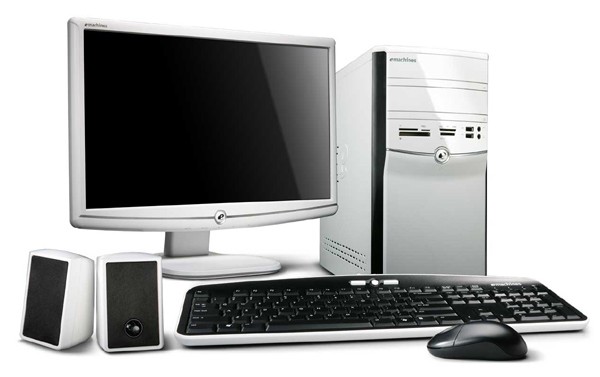
Computer hardware can be divided into several parts :

     CPU (Central Processing Unit)
     Input Device
     Output Devices
     Storage Device

CPU (Central Processing Unit)
The CPU is the most important part of a computer. In it there is a lot of hardware to connect and work processes input devices and send the results to the Output Device. CPU Unit consists of: main board, processor, RAM / Memory, Power Supply, Input / Output Controller, Display Controller, Multimedia Controller, Network Controller.
  • Main board
Main board serves to put the whole device controllers. Including Processor, RAM, Power Supply, I / O Controller, Display Controller and all the equipment is placed in the socket provided by the main board. Manufacturer Main board: Asus P5Series, AMPTRON, Compaq, Chip PC, Gigabyte, ECS, Dell, IBM
  • Processor
Processor is the brain of the computer, such as the human brain in all commands and command results in the process by the Processor. The processor is a chip that is often called "Microprocessor" which is now the size has reached Gigahertz (GHz). The measure is a matter of the speed of the processor to process data or information. Part of Processors the most important part of the processor that is divided into three: Arithmetic’s Logical Unit (ALU) Control Unit (CU) Memory Unit (MU) The more velocity and higher processor technology, the better the performance of the computer.
Interface = Socket 370 (P-3), Socket 478 (P-4), Socket A / B (AMD), PGA 778 (Dual Core and up) For example, Intel P1, P2, P3, P4, Dual Core, AMD Duron, Athlon, etc. 
Manufacturers processors are widely circulated in the market are AMD, Apple, VIA Cyrix, IBM, IDT, and Intel.
  • RAM / Memory
Random Access Memory file storage program executed by the computer functions. The greater the capacity, the more closely the process as well. My experience with the system Windows XP CPU will be very responsive to 2:00 GHz with 512MB RAM. 
Type / Interface = EDO (oldest), SDRAM, DDR1, DDR2, DDR3 (newest, fastest, cheapest)
  • Power Supply
Power Supply serves as the resources used to use all the tools available on the computer. Recommendations When Power Supply for your computer is one that has great power, better computer power advantages. 
Pin Type: 12 Pin Interface (old type), 20 Pin ATX, ATX 20 Pin + 4 Pin, ATX 24 Pin + 4 Pin (Latest)
  •  I / O Controller
Controller to manage devices connected to the I / O ports (Port Serial, PS2, LPT). Examples of devices that connect to the PS2 Mouse, Keyboard P2, Printer LPT.
Interface = ISA, PCI
  • IDE controller and SCSI Controller
The controller is to manage the performance of the devices connected to the IDE or SCSI port. The tools are used to connect hard drives, floppy disks, CD Rom.
Interface = ISA, PCI
  • Display Controller
Display Controller to produce a display to a monitor or TV. There are two types of the first on board, both are often called VGA Card. VGA has its own RAM larger capacity, greater RAM then the display on the monitor will be more subtle. VGA Card also serves to reduce load performance RAM / Memory on the use of certain 3D games, 3D video, and programs that require high-resolution graphics. 
Example RAM VGA: 16, 32, 64, 128, 224, 256, 512, 1G. 
Interface = ISA (Old Type), PCI (Old Type), AGP, PCI-Express (New) 
Manufacturer VGA: Nvidia, S3 Trio, SIS, ATI Rage Series, etc.
  • Multimedia Controller
Multimedia Controller for producing sound often called a Sound Card (Sound). Sound Card Technology Today technology developed to support 3D Surround 5.1 (mean 5 speakers with 1 Central as Base 6 Channel). 
Manufacturer: Realtek, CMedia, ESS, Creative Sound Blaster. Interface = ISA, PCI
  • Network Controller / Network Adapter / LAN Card
Network Controller / Network Adapter / LAN Card are used as a port that connects two or more computers. Usually used for Chat, File Transfer, Database Programs, internet access (if using a modem), Multi Player Games, etc. 
Interface = ISA, PCI


INPUT DEVICE
Device used to enter commands.
  • Keyboard
This tool is to include input ASCII characters to be translated so that the system will generate an order.
Port Interface = Serial / PS2 / USB
  • Mouse
This tool is a pointing device (pointer) that will help to access the computer.
Port Interface = Serial / PS2 / USB
  • Scanner
This tool will convert real image into Image File (File Photo)
Port Interface = LPT / USB
  • Joystick
This tool as a game controller.
Port Interface = LPT / USB


Output Devices
That tool works issued the results of a command input device.
  • Monitor
To display the results of the CPU.
  • Printer
As a means of printed documents. 1. Laser printers, this printer to print quality documents the approach documents have been processed in a computer. 2. Ink-jet printers, laser printers compared to New Media, the initial cost of the printer type more efficiently. 3. Dot matrix printer, this being the most preferred type ON PC era. In this type of printer, the image produced by a collection of the check point spread short distances so it looks uneven. 4. Plotter, printers use a pen set to make World Prints related engineering or architecture. 
Manufacturer : Canon, Epson, HP, Lexmark, Apollo, etc. Port Interface = LPT, USB
  • Speaker 
As the sound output device. We can also use earphones.

Storage Device
That the tool serves as a place to store data in a file.
  • Fixed Hard disk / Hard Disk 
Chasing placed inside the CPU, is used to store files in a very large capacity. At present, the production capacity of hard disk storage has reached more than 512 GB. 
1KB = 1024 B 
1MB = 1024 KB 
1GB = 1024 MB 
For example, file documents / letters usually only takes 200kb, 4MB MP3, Video CD 50MB / song, 700MB / CD full. 
Interface = IDE, SCSI, SATA Manufacturer: Samsung, Maxtor, Seagate
  • Floppy disk Drive
Floppy disk drive is the additional storage that can be moved - moved / not fixed, including the Removable disk. Since capacity is only 1.44 MB floppy disk now abandoned and turned to flash a current capacity up to 8GB, safer and maintenance free. 
Interface = floppy interface 
Manufacturer: Panasonic, Samsung
  • CD / DVD Drive
Used as a media reader CD (Compact Disk / Disk tile) or a DVD. CD / DVDRW can be used to read the CD / DVD, and burn to CD / DVD. The storage capacity of a standard 700MB CD, DVD 1 Layer 4.48 GB, 8.15 GB DVD 2 Layer. 
Interface = IDE, SCSI, SATA 
Manufacturer: Samsung, Liteon, LG, Pioneer


Other Device (Other Devices)
  • Flash Disk 
Flash Disk is also included in the Storage Device, floppy disk the same function, but has a large capacity and maintenance free. My experience using a floppy disk is very uncomfortable and unsafe, because it must be protected from dust, sunlight, water, magnets, etc. A common mistake because unreadable. Flash disk capacity from 512, 1GB, 2GB, 4GB, 8GB and growing. 
Interface: USB
  • Bluetooth Adapter 
This tool converts the digital data into a particular frequency radio signals to connect with other tools such as HP, other PCs, Bluetooth Mouse, Bluetooth Speaker, etc.
Interface: USB
  •  TV Tuner
This tool serves to convert the RF signal (TV signals) into digital signals. With this tool for watching TV on the computer is not a problem. Usually equipped with a radio. 
Interface: PCI / USB
  • External Hard Drive 
Function and capacity similar to a fixed disk / hard drive. The difference this device can be taken anywhere, because it includes the Removable Disk. 
Interface: USB


SOFTWARE
Software is a program, device drivers, and files on the computer. Namely;
  • Operating System (OS)
The operating system is the software that controls the performance of the main system. In determining the OS to consider the compatibility (support for programs to third parties, as well as support for hardware), stability (Often Mistake or not), and Price Range (OS Windows XP Home Edition for dollar cost nearly 800ribu, Linux offers a free OS such as Ubuntu). 
Example OS, DOS 6.22, Windows 3.11, Windows 95, 97, 98, 2000 Server, XP, 2003, Vista, Linux Mandrage, Linux Ubuntu, Suse Linux, etc.
  • Program Application
The application program is a supplemental program to support the performance of the computer. (Price Software Microsoft Office Word, Excel Access to 1.7 million). Example Applications, Office (Word, Excel, etc.), Winamp, Power DVD, Pascal, Application Games, etc.
  • Device Driver 
All the hardware described above will not work without a Device Driver is installed in the Operating System. For example, the printer cannot print without a Device Driver. For Exsample : Suppose we want to install a TV tuner card installed in the PCI slot. Once the computer is turned on it will be confirmation that the new hardware found and then the computer asks Device Drivers for new hardware. This could mean that the computer wants to know what the name, the function and workings of the new hardware and ask identifier wheel / in the form of software (usually included in the package tool). After we gave the driver files in the form of software, the computer will know that the name of this tool is the TV Tuner, Brand A, mounted on a PCI-X slot, and so on. However, the operating system has been equipped with many hardware-hardware drivers that are often used in PCs. If we put a new tool to the computer then the tool is ready for use, it is called Tool Compatible. Stay updated drivers so we can work optimally. For example, flash, LX-300 Printer, Monitor.

Minggu, 01 November 2015

Know What Overclocking / Overclocking

Overclock might be a foreign language to a beginner in the field of hardware. But for those who have advanced the field of hardware, the word is a word used raw and in their daily lives. Overclock composed of two words is over and the clock, which means setup mainboard and a processor clock for VGA. Overclock can be interpreted to make the computer more quickly.

Not known since when overclocked started. Estimated overclock already started in 1985. The first computer that sold the type of PC XT with Intel processor type (8088) and made quicker work of the NEC V20 processor. Overclock starting to bloom when the Pentium processor and 486 DX Classic first. But when its overclocked processor can only be done with a jumper on the mainboard. For example, Pentium 166Mhz using jumper for reached 200MHz speed, there is little difference between 166 MHz and 200MHz, But good enough to pace that year.

The main objective is the spurring overclock a processor VGA and CPU for faster work. Currently easier to overclock with existing technology, because of the availability of the enhancements, and supported by the mainboard companies to enter the BIOS overclock system. Allow everyone makes computer with overclock.

There are also special purposes a trend after 2000, for gaming applications. Use overclocking / overclocking can cause a dramatic increase in your computer, depending on what you do overclocking. To perform overclocking you simply change the default BIOS settings, and for advanced overclocking you need to have a deeper knowledge. The more you do extremes overclocking the higher the risk, because overclocking maximize your hardware, it causes excessive heat, make sure the air system and the computer is a very good place to place your computer in a room that has air conditioning. If it is not the motherboard, processor, computer, VGA card may be burned, even though the computer has had the system automatically turns off in case of overheating. You need to remember the hardware warranty does not cover damages caused by overclocking!!! By doing overclock, a computer will be faster and more convenient to enjoy. With overclock all devices will increase. The last function is the most commonly used objective.


Selasa, 20 Januari 2015

New Gadgets in 2013

Elitebook Folio 9470m
The rise of the Ultrabook market is currently made HP take different steps to market Elitebook Folio 9470m. Ultrabook is designed specifically for businesses, and in the claims pass 26 standard military test United States, heat and cold, and pass drop tests from a height of 18 inches in a variety of angles. Excess is what is on offer through the HP Elitebook Folio 9470m which has a thickness of 19 mm and weighs 1.63 kg with 14-inch wide screen, with the Intel Core-I engine the third and 4GB RAM, making Elitebook Folio 9470m looks thin but great in performance .

Panasonic Toughbook
Panasonic introduced the Toughbook series mobile computer. The advantage of the Toughbook is resistance to impact and water. One is the Toughbook Android devices, has launched six models: CF-35, CF-H2, CF-SX2, CF-19, CF-U1 Toughbook UMPC and TABLET A1 and has IP65 certification (Passed down and splashed water resistance). Toughbook notebook series is intended for outdoor use / office that require resistance to knocks and moisture.

Microsoft Surface
Microsoft did not want to miss and Surface release tablet, equipped with technologically ARM processor and runs the latest OS Windows 8 RT. Surface has a 11-inch screen, Nvidia T30 processor, 2 GB of RAM and front and rear camera capable of recording 720p video. Microsoft Surface also comes with Office Home and Student 2013 RT Preview the bias in the free upgrade to the full version. Microsoft Surface tablet also comes with USB 2.0, MicroSD, Mini HDMI, Wi-Fi, Bluetooth and a 3.5 mm Audio Jack. Microsoft will release two versions 32 GB and 64 GB.

Acer Cloud Mobile S500
The seriousness vendor Acer to target the Smartphone market by releasing its newest product indicated Acer S500 Mobile Cloud, formerly known as Acer PC and Notebook products. As the name suggests the device comes with Cloud Computing, users will be given an account Acer Cloud with infinite capacity and use the Android OS Ice Cream Sandwich. Cloud Mobile Acer S500 has a 4.3-inch HD IPS, 1.5 GHz dual core processor, 1 GB of RAM and an 8 Megapixel camera.